Building a Deep Research Agent at NationGraph
October 2026
Sales reps used to manually research prospects one account at a time. During my summer internship at NationGraph, I worked with Adam under the guidance of Jason to build a research agent that automates this process across hundreds of accounts, with cited and typed answers.
The problem
NationGraph turns public records — purchase orders, contracts, meeting minutes, budgets — into buying signals for sales teams. Our users are mostly sales reps who use our data to find out which accounts (public sector institutions) are about to spend money in areas they sell into.
Our standard pipelines cover about 80% of the data users ask for. The remaining 20% asks for data that isn't stored as a standardized field in our database. The information is still extractable, but it is scattered across different sources for each account, and confirming it often means cross-referencing several of them. A fixed pipeline can't handle this, since every new user request would need its own pipeline.
The solution
We built a deep research agent to fulfill those requests on demand.
The agent itself is a ReAct loop — reason, call a tool, add the result to memory, repeat.
An agent consists of two things: a model and a harness. The model is the cognitive engine, and it is stateless and inert. We reach it through an API call to OpenRouter, which returns one turn of reasoning and one tool call.
The harness is the software infrastructure around the model, and it supplies the following:
- Memory: An array of messages, passed to the model on every API call. The array starts with the system prompt and the user's queries. Model reasoning and tool call results are appended to this array.
- Tools: The harness executes the tool that the model requested and writes the result back into memory.
- Boundaries: It decides whether to continue iterating the agent loop, guaranteeing that the loop terminates and returns a valid artifact.
We provide the following tools to the agent:
- MCP tools: Search and fetch internal data regarding meeting minutes, budgets, etc.
- Exa web tools: Search and fetch web data using Exa API.
- submit_results tool: Submits the agent’s final answers after validating that they follow the output JSON schema.
Internal and web data complement each other in allowing the agent to synthesize a comprehensive answer.
Internal data is primary-source and more detailed on spending and decisions, with data sources like meeting minutes, budgets, purchase orders, and legislation. Web search has broader coverage, but source credibility varies.
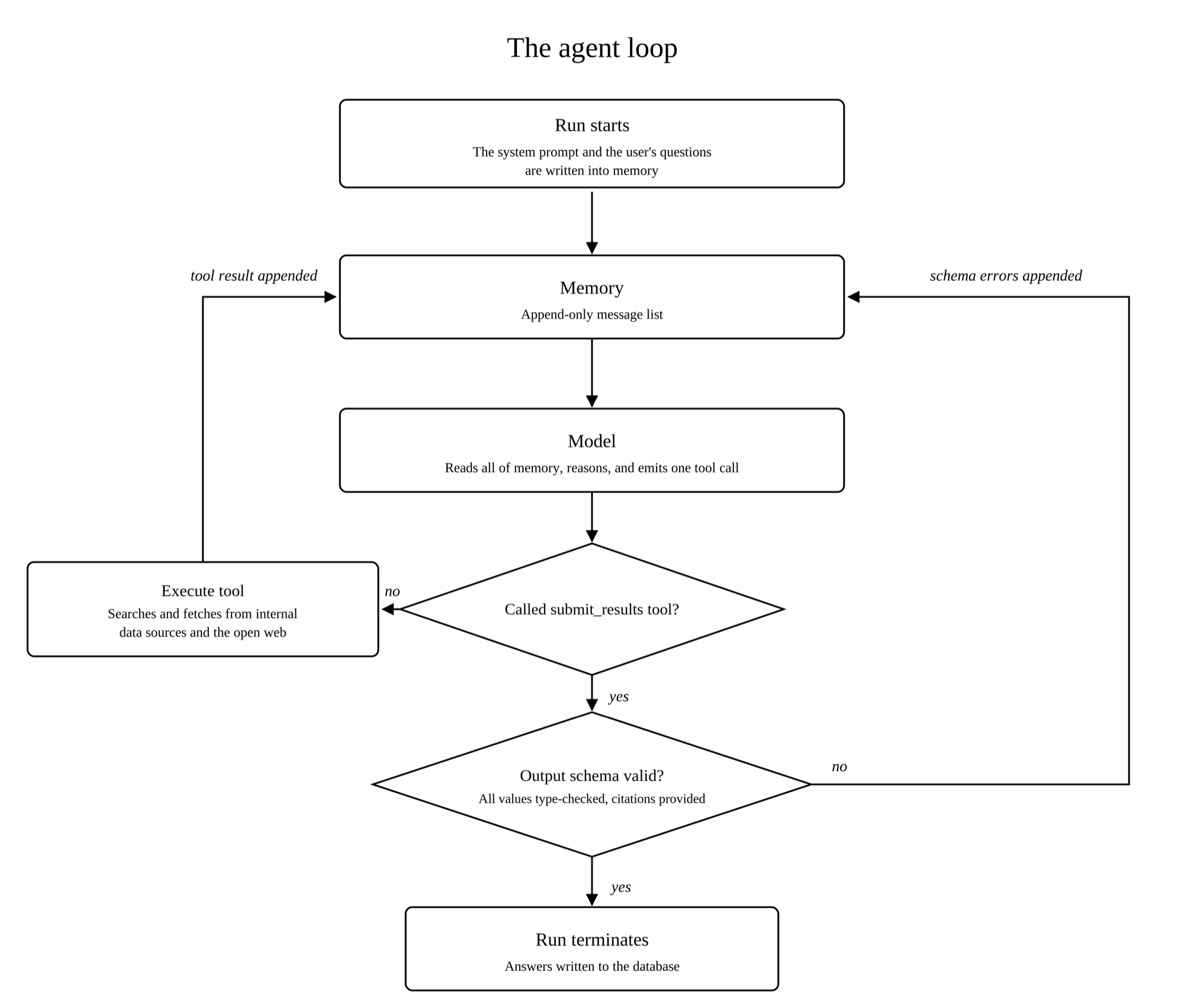
Our research agent can retrieve non-standardized data because it decides what to search and fetch next based on what its previous tool calls returned, effectively building a pipeline in real time.
Beta testing after v0
After building an MVP, we put the feature in front of account managers and sales reps in our company and watched them use it without providing any guidance. This allowed us to see where our assumptions about the UX broke down before shipping to prod.
We designed the creation flow of Deep Research assuming that users could write well-scoped research questions. During beta testing, we realized that they did not.
The quality of agent output is constrained by the integrity of the user input. Poor input will result in a weak agent response, and the user will likely blame the product instead of the question.
Therefore, instead of asking users to write the queries for the agent, an internal chat agent asks the users what they're trying to accomplish with Deep Research and then helps them write the research questions against our internal guidelines. This maintains input quality and reduces user effort in creating a Deep Research run.
Additionally, after creating a Deep Research run, many users immediately asked how long it would take. That was hard to answer, because runtime depends on two things: how many jobs are in the shared job queue, and how much searching each agent does before it settles on an answer. That second factor matters most, and we won’t know its value until the run finishes. So we estimate from the number of jobs in the queue and show a range: a likely ready time if these jobs go at a typical pace, and a later time if they’re slow.
Cost optimization after shipping v1
When Deep Research first hit production, each agent run was expensive enough that cost became the main barrier to adoption. This is because during our first iteration, we focused on getting the agent to provide the most comprehensive answer without watching its cost.
In our second iteration, we focused on cutting the cost of the agent.
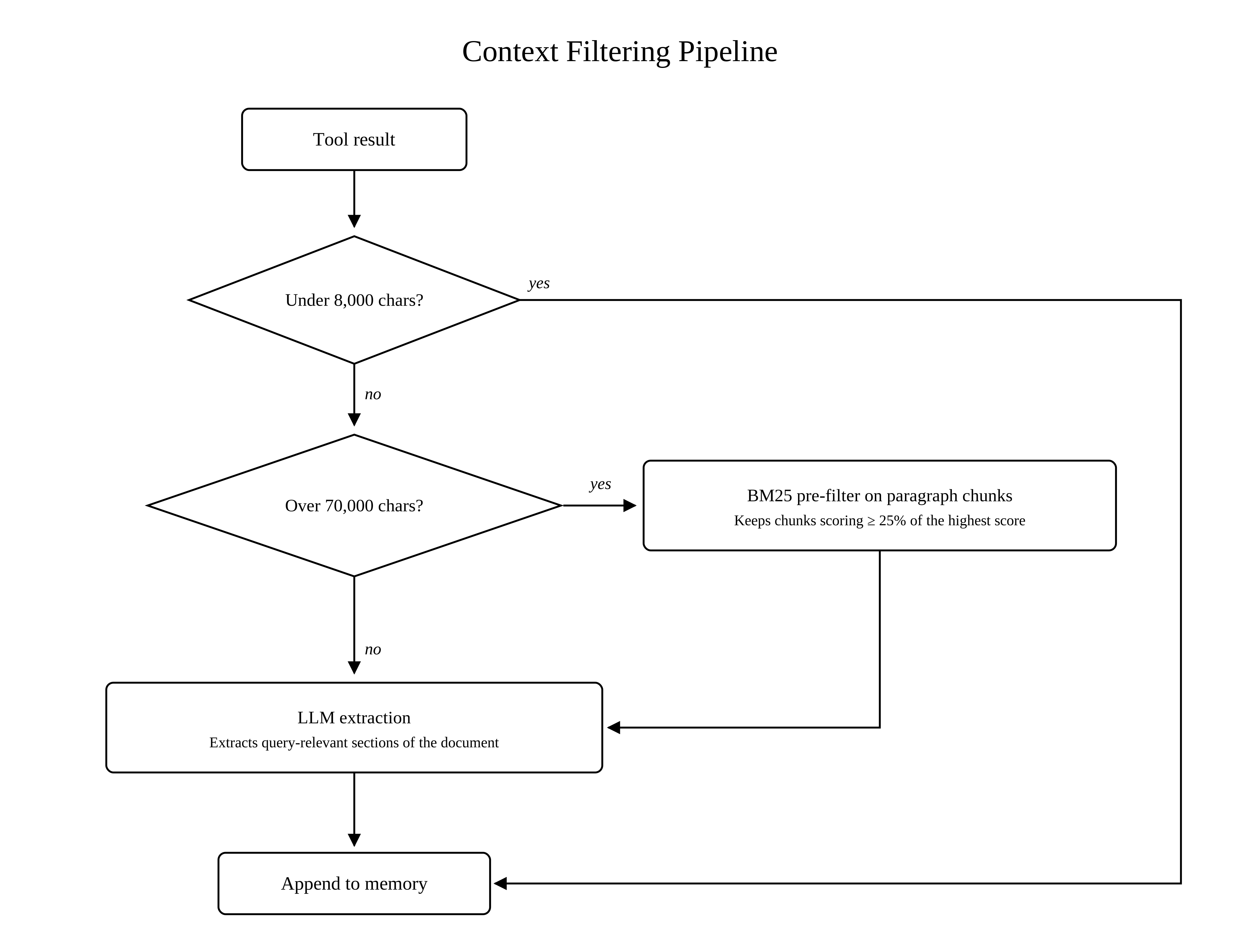
We did this primarily through building a context filtering pipeline. The pipeline runs right after every tool call to keep only query-relevant information in the result before it gets added to memory. This change led to a 46.7% reduction in cost per agent run, without affecting accuracy. Cost and accuracy were measured through performing agent evaluations on a dataset of user queries and expected answers.
Memory size was the main source of cost during the agent run. The model is stateless, so the entire message array has to be re-sent on every API call. Each turn is billed for the whole conversation, and cost grows with the square of the number of turns.
Before this, we were already using prompt caching, which helped but didn’t solve the problem. Because memory is append-only, most of it is served from cache every turn. However, cached tokens are discounted, not free. Additionally, writing input tokens into cache is expensive. Therefore, context filtering was a necessary solution.
Impact
We measured the impact of this project by the amount of credits spent on the feature.
Approximately $150k worth of credits were spent within the first 3 months of launch.